

Aerion shows the key figures of your projects on the Clients & projects board, in the KPI tiles above it and in the Insights tab of each project. This article explains every figure you can show.
Tip: Hover over a column header to see its explanation right in Aerion.
Show more figures
The board shows only some of the available columns. To add, remove or reorder columns, click Display → Customize table…. The figures are grouped as in the list below. To show figures as tiles above the table, turn on Show KPIs under Display and choose them with Customize KPIs….
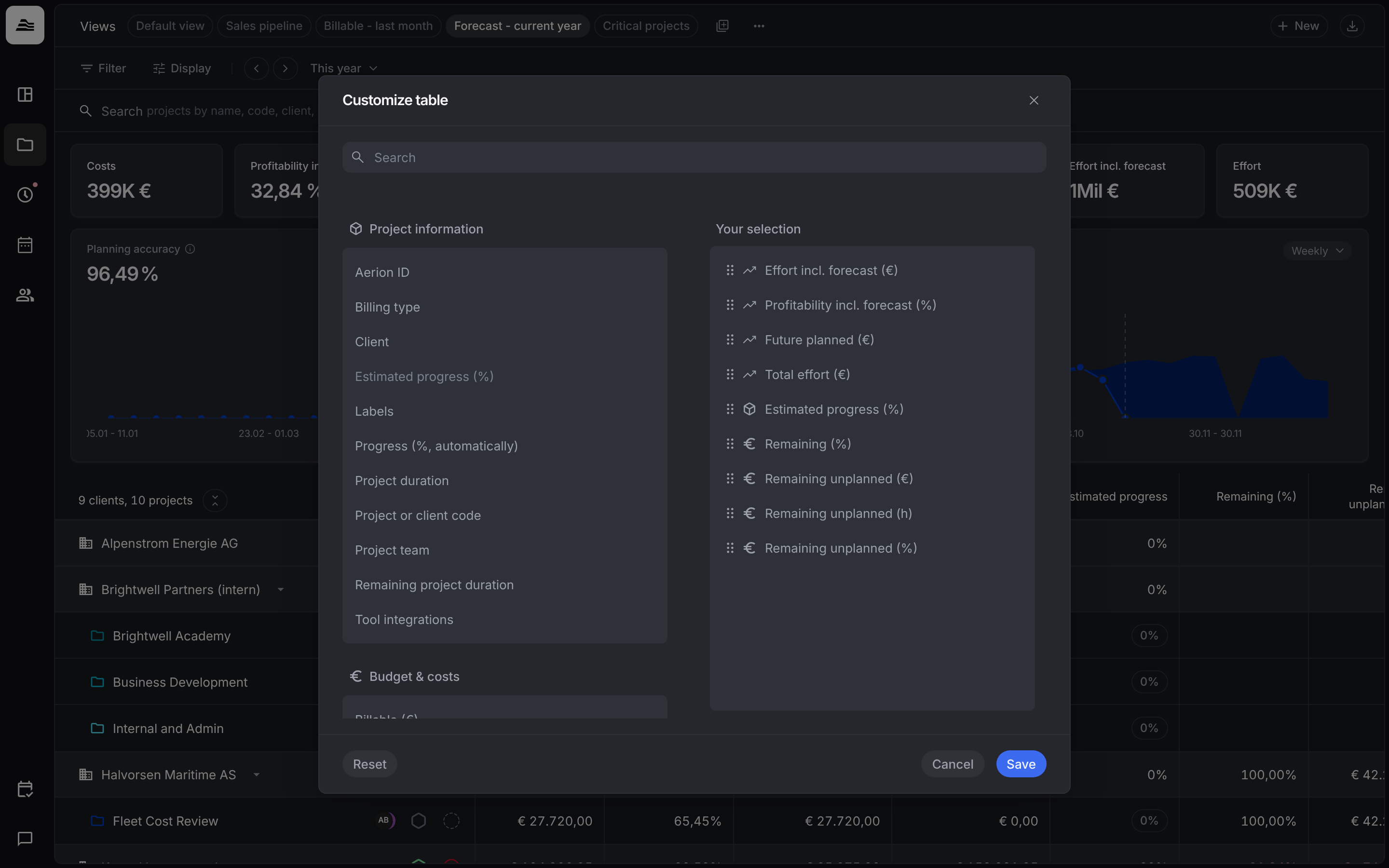
Project information
| Figure | Meaning |
|---|---|
| Billing type | The billing type of the project: Fixed price, Time & material or Non-billable. |
| Aerion ID | You need the Aerion ID to sign in to Aerion, for example in the desktop app or the browser extension. It is the subdomain of your Aerion account. |
| Code | Project or client code. |
| Labels | Project or client labels. |
| Project team | All staff members that are working together on the project. |
| Integrations | Client and project integrations to external tools, e.g. ticketing or accounting. |
| Progress | The calculated progress between project start and project end in percent. |
| Estimated progress | The manually estimated progress between project start and project end in percent. |
| Project duration | The project duration. |
| Remaining project duration | The time remaining until the end of the project. |
Budget & costs
| Figure | Meaning |
|---|---|
| Budget (€) / Budget (h) | The total budget, shown in euros and in hours. |
| Used (€) / Used (h) / Used (%) | The used budget, shown in euros, in hours and in percent. |
| Remaining (€) / Remaining (h) / Remaining (%) | The remaining budget, shown in euros, in hours and in percent. |
| Remaining unplanned (€) / Remaining unplanned (h) / Remaining unplanned (%) | The remaining unplanned budget, shown in euros, in hours and in percent. |
| Hourly rate | All hourly rates used on the project. |
| Forecast hourly rate | The forecast hourly rate and the planned hours form the basis for your revenue forecasts. |
| Billable (€) | The billable amount from time entries and expenses. |
| Expenses | The total of the expenses. |
| Deal probability | The estimated likelihood, expressed as a percentage, that an open deal will be successfully closed. Used to weight revenue forecasts. |
| Sales forecast (total) | The total projected revenue from all upcoming deals without any probability weighting applied. This represents the full potential sales value assuming all deals are won. |
| Sales forecast (weighted) | The projected revenue from upcoming deals, calculated by applying the probability weighting to each deal's value. This provides a risk-adjusted view of expected sales. |
Planning & forecast
| Figure | Meaning |
|---|---|
| Planned (€) / Planned (h) | The value of planned hours within the selected time frame, shown in euros and in hours. |
| Future planned (€) / Future planned (h) | The value of future planned hours, shown in euros and in hours. |
| Total effort | The total amount from billable time entries and expenses. |
| Effort incl. forecast (€) | The total amount from billable time entries and expenses, plus the value of future planned hours. |
| Costs incl. forecast | The costs for staff and expenses, plus the costs of future planned hours. |
| Contribution margin incl. forecast | Effort incl. forecast minus costs incl. forecast. Shows the expected contribution to fixed costs and profit. |
| Profitability incl. forecast | The average profitability from the start of the timeframe until today, as well as the projected profitability based on the current planning. |
| Capped effort | Effort capped at the project budget when the setting is on, or the invoiced amount once the project is completed. |
| Capped effort incl. forecast | Effort incl. forecast, capped at the project budget when the setting is on, or the invoiced amount once completed. |
Time tracking & billing
| Figure | Meaning |
|---|---|
| Tracked (h) | The total hours of all time entries. |
| Tracked (€) | The value of the billing time of billable time entries in €. |
| Billing time | The total billing hours of billable time entries. |
| Billable (%) | The percentage of billable time compared to the total tracked time. |
| Invoiced | The total invoiced amount from all internal and external invoices. |
| Planned invoiced | Total amount across all planned internal and external invoices. |
| Next invoice | The date of the next planned invoice within the project or for the client. |
Performance indicators (KPIs)
| Figure | Meaning |
|---|---|
| Contribution margin | Effort minus costs. Shows the contribution to fixed costs and profit. |
| Profitability | The profitability of a project is calculated depending on its status. As soon as the project status changes to "Completed", the profitability is calculated based on the invoiced amount and costs. If a project is not yet completed, the profitability is calculated based on the tracked amount/ expenses and costs. |
| Planned vs. actual (h) / Planned vs. actual (€) / Planned vs. actual (%) | The deviation of the tracked time from the planned time, shown in hours, in euros and in percent. |
Related
- Clients and projects: views, filters and display options of the board.
- Budget and hourly rates: the settings behind budget, rates and the budget cap.
- Project insights and activity: the figures of a single project.