

Clients & projects board
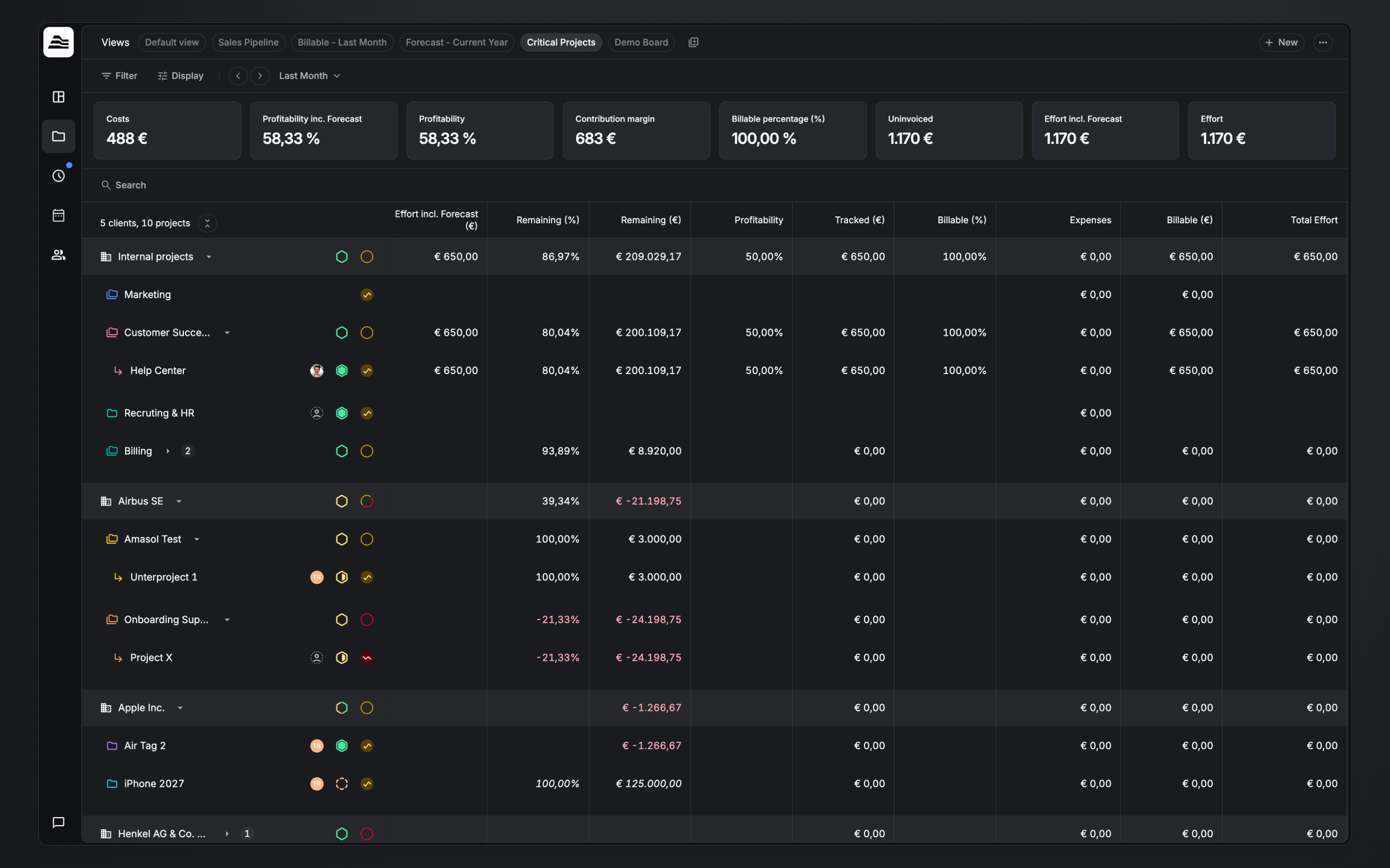
The Clients & projects board is your portfolio overview — every client and project in one table, with the financial KPIs, profitability, and planning accuracy that show how the business is doing. It's the projects-side counterpart to the Project planner, which focuses on capacity and assignments over time.
Required rights
View access to at least one project
Reading the board
- Rows. Clients (and client groups) contain projects, which contain sub-projects. The count above the table (e.g. "14 clients, 36 projects") reflects what's currently in view.
- Row info. Each row shows the project lead, status, and health, its billing type (Fixed price, Time & material, or Non billable), and the financial columns you've chosen.
- Hours columns. Tracked (h) is the raw recorded hours; Billing time is the billable (rounded) duration.
- The table's columns are yours to choose — see Customize the table below.
KPI cards
A strip of financial KPIs summarizes everything currently in view, for the selected scope — for example Costs, Profitability, Profitability inc. Forecast, Contribution margin, Billable percentage, Uninvoiced, Effort, and Effort incl. Forecast.
Toggle the strip with Show KPIs, and use Customize KPIs to choose which cards appear and drag them into order. The available KPIs are grouped into Time tracking & billing, Budget & costs, and Performance.
Planning accuracy
The planning-accuracy chart plots tracked effort over time against what was planned. Shaded areas mark the periods where work was underplanned or overplanned, and the headline percentage is your overall planning accuracy — how closely planned hours matched the hours actually tracked. Toggle it with Show planning accuracy.

Scope
Use the scope control (e.g. All Time, or a custom range) to set the timeframe the KPIs, chart, and figures are based on; the date arrows move the window.
Display options
Open Display to control what the board shows:
- Show planning accuracy — show or hide the chart.
- Show KPIs — show or hide the KPI strip; Customize KPIs… picks and reorders them.
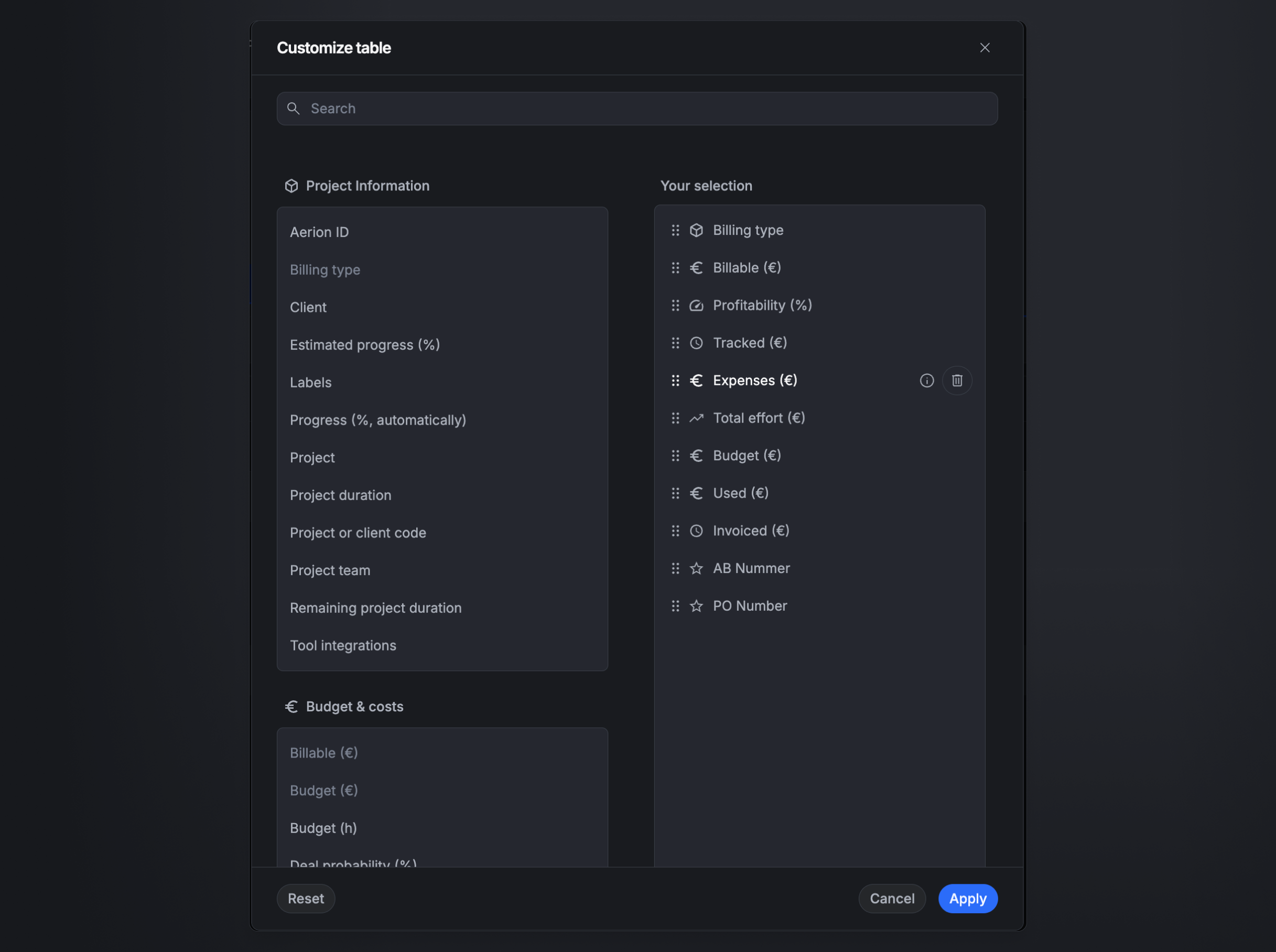
- Customize table… — choose and reorder the table columns (see below).
- Show future projects — include projects that start in the future.
- Show projects without effort — include projects with no tracked time.
- Show archived projects — include archived projects.
- Show clients without projects — include clients that have no projects.
Customize the table
Customize table… lets you choose which columns appear and drag them into the order you want. Columns are grouped — Project information, Budget & costs, Time tracking & billing, and Performance — so you can build a view focused on, say, profitability or budget. Your own custom project fields (for example PO Number or AB Nummer) are available here too.
Filtering
Open Filter to narrow the board:
- Status — Deal, Pending, In planning, In progress, Completed.
- Project health — On track, At risk, Critical, No status.
- Billing type — Fixed Price, Time & material, Non billable.
- Project visibility — All projects, My team projects, or Project Lead (pick a person).
- Range filters — Planned project time, Days until next invoice, Billable amount, Remaining budget (each set to Any or a range).
- Narrow by — Clients, Projects, Tasks, Client labels, Project labels, Staff labels.
- Reset clears all filters.
Views
Save a configured board — its filters, display options, columns, KPIs, and scope — as a named view (for example Sales Pipeline, Critical Projects, or Forecast - Current Year) and switch between your views and the default view in one click. Create a new view with + New.
Related
- Project planner — plan capacity and staff projects over time.
- Bill projects — create and manage invoices for a project.