

Project invoicing
The Invoicing tab of the project details panel brings a single project's billing into one place — its Invoices, Planned invoices, and Expenses. It's the project-level view of the invoicing workflow; the full step-by-step how-tos live in the Invoicing section and are linked below.
Required rights
Project management
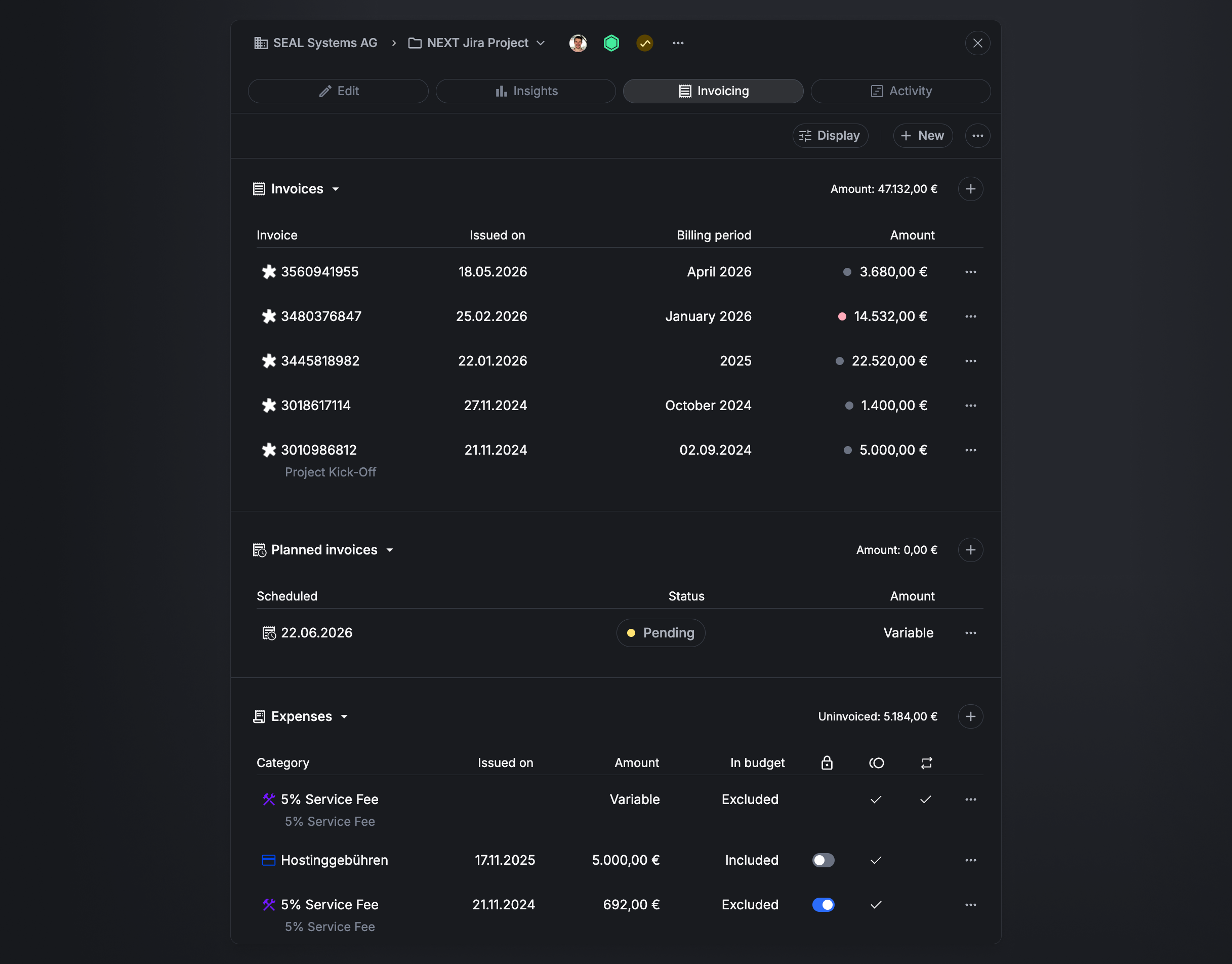
Use Display to adjust what's shown and + New to create an invoice. Each section also has its own + to add an item.
Invoices
The invoices issued for this project, with the section total (e.g. Amount: 47,132 €). Each row shows the invoice number, Issued on, Billing period, and Amount:
- A coloured dot on the amount shows the invoice's payment state — grey Due, red Overdue, green Paid.
- An easybill icon next to the number means the invoice was created in easybill.
Editing an invoice (Edit Invoice) lets you set the Payment status (Automatic, provided by easybill, or set manually), Amount, Billing period, Issued on date, and Notes — with a Summary of the amount, expenses (split into excluded from and included in budget), and total.
For the full create / edit / delete flow, see Invoice projects.
Planned invoices
Upcoming invoices scheduled for the project, with the section total. Each row shows the Scheduled date, Status (e.g. Pending), and Amount (a fixed value or Variable).
Editing a scheduled invoice (Edit scheduled invoice) covers its approval — Waiting for approval, with a change Comment and a History — plus Billing mode, Amount, Billing period, Planned invoice date, and a Note. See Plan invoices.
Expenses
Extra project costs, with the uninvoiced total (e.g. Uninvoiced: 5,184 €). Each row shows the Category, Issued on, Amount, and whether it's In budget (Included / Excluded), plus three toggles:
- Locked / invoiced (lock) — the expense has been invoiced and is locked, so it can't be selected for another invoice.
- Billable (coins) — whether the expense is billable.
- Recurring (arrows) — the expense can be reused on every invoice for the project. This suits costs like a service fee that apply to multiple invoices, so you don't have to recreate the expense each time.
Editing an expense (Edit expense) sets its Category, Billing frequency (One time / Recurring), Billing date, Budget & costs (Included in project budget, Is billable, Internal Costs, Billing amount), an optional File, and a Note. See Invoice expenses.
Related
- Invoice projects — create, edit, and delete invoices.
- Plan invoices — schedule invoices in advance.
- Invoice expenses — add and invoice expenses.
- Down payments — offset an advance payment via a negative expense.